 Soku AI
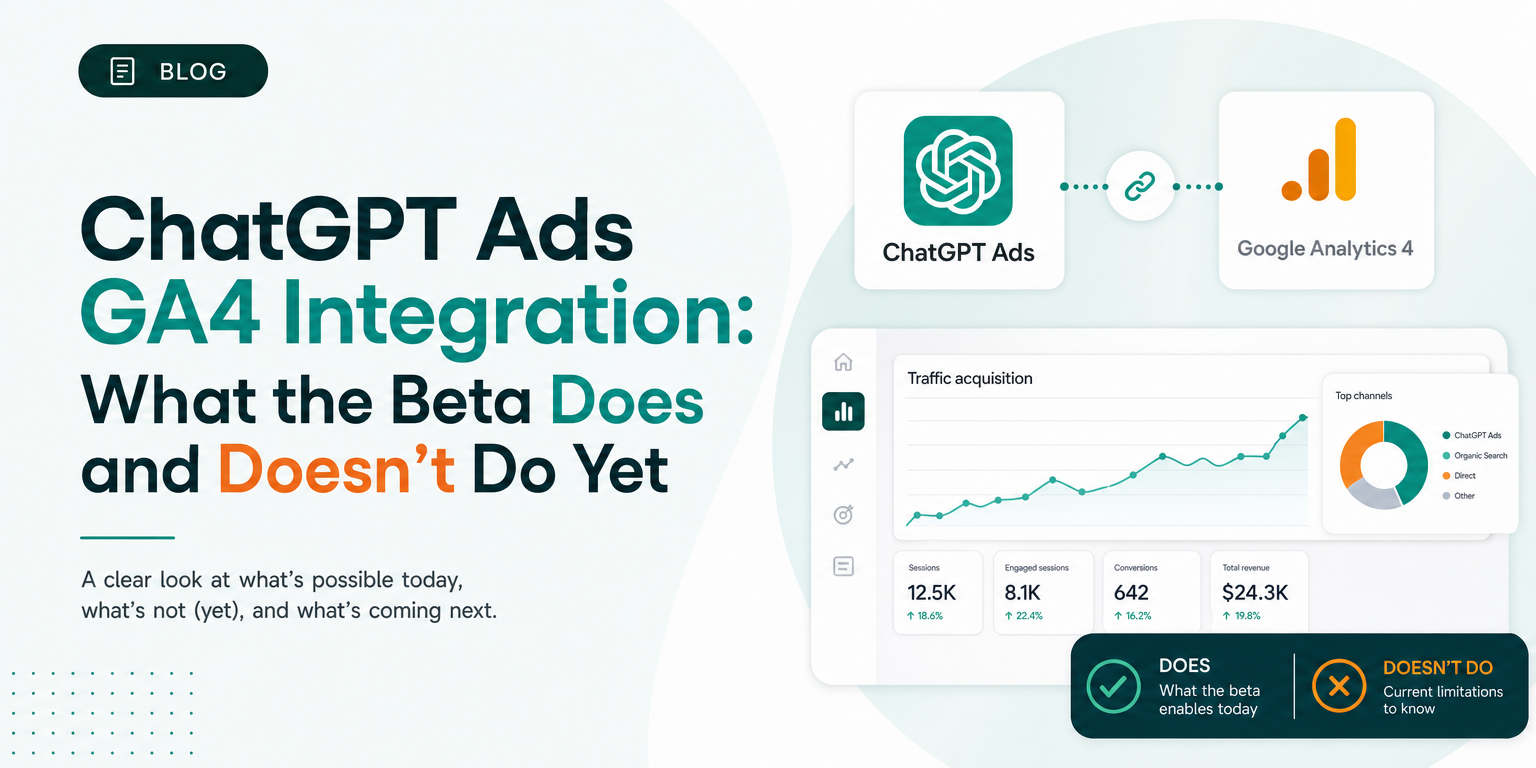
OpenAI has added a way to connect Google Analytics 4 to OpenAI Ads Manager. The help article appeared in the ChatGPT Ads collection this week; Soku's documentation monitor first captured it on 2026-10-05. On the same run, the list of named measurement partners in OpenAI's help centre grew from 9 to 15.
This is the integration most advertisers have been asking for, because GA4 is where they already judge every other channel. It's worth reading the article closely, though. When we first wrote this, the beta only connected the property. It did not yet turn GA4 events into ChatGPT Ads conversions. If you connect it expecting GA4 to back up your campaign numbers, the screen you get will confuse you.
Update, 2026-10-19: event mapping is live in the documentation. OpenAI rewrote the article; the monitor caught the change on 2026-10-19, and the article showed "Updated: 3 days ago". The line "Event mapping is coming soon" is gone. The article now documents a Map your events step, which pairs each GA4 event with an Ads Manager event, and a GA4 Conversions column for the Campaigns view. It also states what OpenAI imports: read-only, aggregate reports covering dates, event names and counts, source/medium, campaign names, key-event counts and purchase revenue. The initial import covers the previous 30 completed days, and data then updates daily. OpenAI says it uses the data "for attribution comparisons and, where eligible, campaign optimization." We have updated the steps, quotes and tables below. Sections still describe the 2026-10-05 version where we say so.
Below: what OpenAI's text actually says, what the beta does and doesn't do, why GA4 and Ads Manager will disagree even with mapping in place, and what to set up now. Facts are quoted from OpenAI's documentation and dated. Analysis and recommendations are marked as Soku's. For a full overview of the channel, start with our ChatGPT Ads guide.
What OpenAI published
The new article is Connect Google Analytics 4 to OpenAI Ads Manager. It opens with the purpose of the feature:
"Connecting Google Analytics 4 (GA4) lets advertisers share GA4 data with OpenAI to support campaign optimization, where eligible, and compare attribution results between OpenAI Ads Manager and Google Analytics."
The availability note right below it now reads, as of 2026-10-19:
"This feature is in beta. Reach out to your account manager to get early access."
On 2026-10-05 the same note went on: "The current beta supports connection setup. Event mapping is coming soon; advertisers will need to map their GA4 events to OpenAI events to enable reporting." Those two sentences have been removed, and the mapping step is now documented (see below). The stated goals are unchanged: optimization ("where eligible") and comparing attribution between the two systems.
Requirements
OpenAI lists three prerequisites:
- Access to the advertiser account you want to connect.
- A Google account with at least Viewer access to the relevant GA4 property.
- Your organization's authorization to connect the property and allow OpenAI to retrieve and use its GA4 data.
And one structural limit: an advertiser account can have one GA4 connection with one selected property.
That limit is the first thing to plan around. If one brand runs separate GA4 properties for its website and its app, or per country, a single ChatGPT Ads account can connect only one of them. Agencies using one advertiser account per client are fine. A single account selling across several properties is not, and the property you pick is the one Ads Manager will compare against (Soku analysis).
How to connect GA4 to OpenAI Ads Manager
These are OpenAI's documented steps, current as of 2026-10-19:
- In Ads Manager, open the advertiser account you want to connect.
- Go to Conversions → Data Sources, select Create, then choose Google Analytics 4.
- Review the connection information and terms, then select Agree.
- Choose the Google account that has access to your property, review the request for read-only Google Analytics access, then select Allow.
- Back in Ads Manager, choose your GA4 property, check its name and property ID, then select Select property and import.
Then map your events. After the import, OpenAI's article says to review Preview data mapping, where "each row pairs a GA4 event with an Ads Manager event." Use Search GA4 event to find a specific event, review any pre-filled mappings, and use the dropdown to pick the Ads Manager event that matches what the GA4 event means in your implementation. OpenAI's examples are generate_lead → Lead Created and page_view → Page Viewed. A row showing "Missing event" has no Ads Manager event selected yet. Select Save when you're done.
Then add the column. To see GA4 results next to campaigns, open Campaigns → Customize columns and, under Conversion Events, select GA4 Conversions, then Save changes. OpenAI notes that the property-wide Events total in Data Sources "is separate from the GA4 Conversions column in the campaign view." The article does not explain how GA4 Conversions are credited to a campaign.
GA4 now sits in the same Data Sources list as your Measurement Pixel and Conversions API sources. Note what you are agreeing to in step 3. OpenAI's article says connecting "gives OpenAI read-only access to data from the property you select". It also says it "authorizes OpenAI to retrieve and use the selected property's data on your organization's behalf under the Advertising Terms", and that you confirm your organization "has provided the required notices, has and will maintain the necessary rights, consents and lawful bases". This is a data-sharing agreement, not just a reporting toggle. If your privacy notice or consent setup doesn't already cover sharing analytics data with ad platforms, get the right person to approve it before someone clicks through (Soku analysis).
Two failure modes are documented. If you can't find the property, OpenAI says to "make sure you use a Google account that can access that property" and notes that your GA4 administrator can help check your access. If your organization restricts third-party Google apps, ask your Google Workspace administrator to review the connection request: "Don't bypass Google security warnings." If Ads Manager asks for authorization again later, reconnect from the connection in Data Sources. To stop sharing, open the GA4 connection settings and select Disconnect.
What you'll see after connecting
Back in Data Sources, the GA4 connection shows its status, the latest successful sync and imported activity. As of 2026-10-19, OpenAI describes the data like this:
- What is imported: "aggregate reports from your selected GA4 property, including dates, event names and counts, source/medium, campaign names, key-event counts and purchase revenue."
- Initial import: the previous 30 completed days across traffic sources, in the GA4 property's time zone. Today's activity is excluded.
- Refresh: "Data is updated daily."
- Seven-day trend: the most recent seven complete days compared with the seven days before them.
- Counting: the mapping screen lists distinct event names, while the Events value on the data-source row counts imported activity.
Then comes the sentence that matters most:
"These totals cover the property's traffic across sources, not just purchases, key events or activity attributed to OpenAI ads. They aren't campaign conversion counts or ROAS. When comparing with GA4, use the same property, reporting dates, time zone and filters."
So the Data Sources screen is a property-wide event count. It covers organic, paid search, email and direct traffic as well as anything from ChatGPT. It shows that the pipe works and the data is fresh. It doesn't tell you what your ChatGPT Ads campaigns produced. Anyone who reads a jump in the seven-day trend as campaign lift is reading the whole property's traffic (Soku analysis).
Does it import conversions or change bidding?
Partly, and only part of it is explained. The two outcomes advertisers want from a GA4 link are reporting campaign results in GA4's terms and optimizing on GA4 conversions. Here is where each stands, in OpenAI's words:
| What you might expect | What OpenAI's article says (2026-10-19) |
|---|---|
| GA4 events map to ChatGPT Ads events | Yes. "Each row pairs a GA4 event with an Ads Manager event", some mappings pre-filled. On 2026-10-05 this was "coming soon". |
| GA4 results shown per campaign | A GA4 Conversions column can be added to the Campaigns view. How it credits conversions to campaigns is not described. |
| Campaign ROAS from GA4 revenue | Purchase revenue is imported, but the Data Sources totals "aren't campaign conversion counts or ROAS." No GA4 ROAS column is documented. |
| Bidding optimizes on GA4 data | Data is used "for attribution comparisons and, where eligible, campaign optimization." Eligibility is not defined. |
| Attribution comparison between the two systems | Named as a use of the data. The GA4 Conversions column is the only comparison view described. |
| Multiple properties per account | No. "One GA4 connection with one selected property." |
Our reading: mapping and the campaign column are the parts that were missing on 2026-10-05, and both are now documented. What is still undocumented is how the GA4 Conversions column attributes results to a campaign, and what makes an account "eligible" for optimization on GA4 data. Treat the optimization line as a stated intent, not a capability to plan a budget around.
Why GA4 and ChatGPT Ads will still disagree after mapping
Even with mapping in place, the two systems will report different numbers for the same campaign. That's normal, and you can predict most of the gap from OpenAI's own documentation.
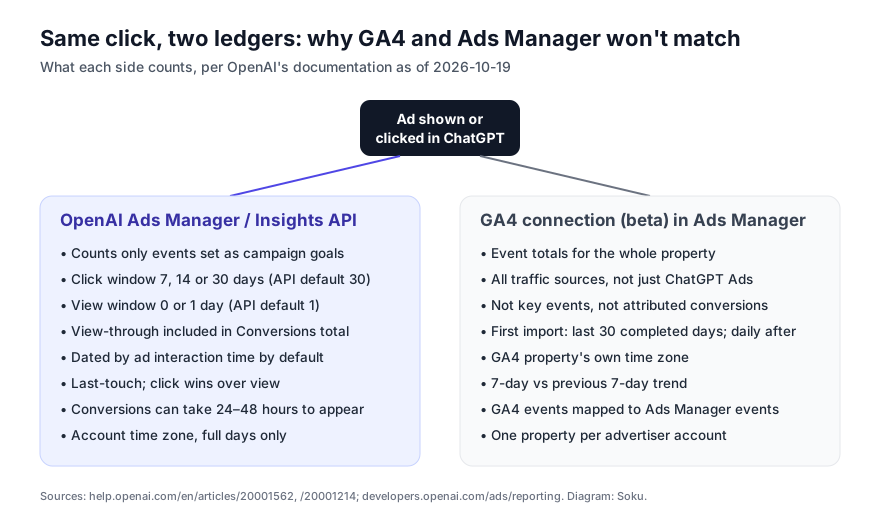
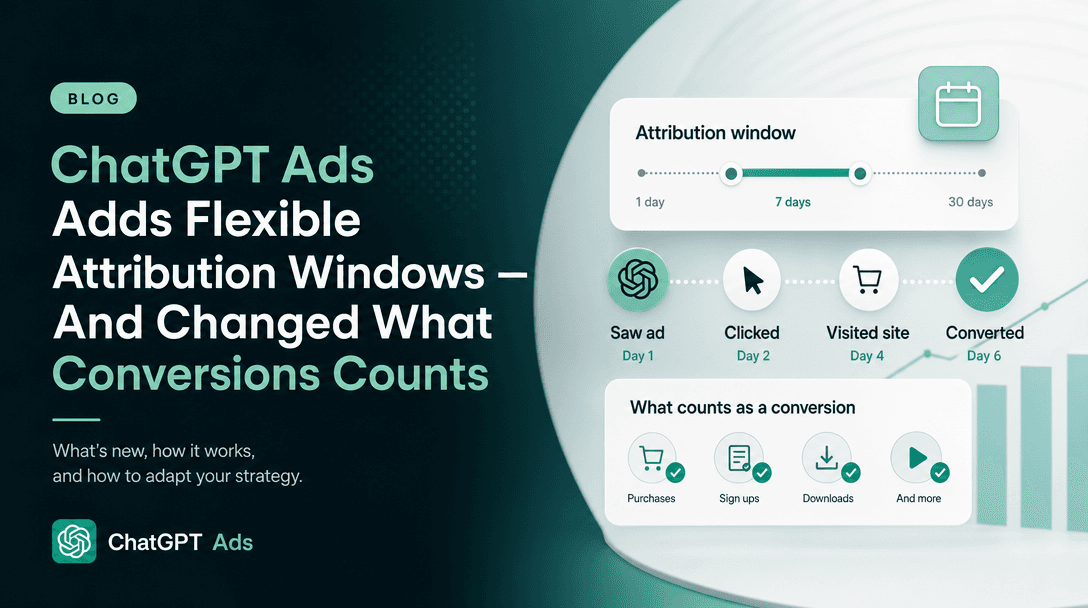
Ads Manager's side. The Measure Results article says advertisers can choose "a 7-, 14-, or 30-day click-through reporting window and either 0 Day (disabled) or a 1-day view-through reporting window", and that at 1 Day, "eligible view-through conversions are included in the Conversions total." By default, Conversions "uses ad event time — the time of the ad click or impression that received credit for the conversion." The attribution is "OpenAI's existing last-touch attribution logic and is not multi-touch attribution." Attributed conversions "can take 24–48 hours to appear." We covered the reporting-window change itself when it landed in ChatGPT Ads flexible attribution windows, and the reporting lag in why ChatGPT Ads spend and conversions show up late.
What changed on 2026-09-30 in the API. OpenAI's developer changelog for September 30 reads: "Added selectable click/view attribution windows and time basis to all four GET Insights endpoints. Omitted settings now default independently to 30-day click, 1-day view, and ad-event time. Conversion totals include click-through plus view-through goal conversions and can differ from previous reports; impressions, clicks, and spend are unchanged." The Reporting guide adds that the endpoints "now default to 30-day click, 1-day view, and ad-event time, including when settings are omitted. Neither provides a legacy reporting mode."
This matters for GA4 reconciliation because many teams pull ChatGPT Ads numbers through the API into a spreadsheet or warehouse and compare them with GA4 there. If your pipeline was built before September 30 and never sent the window parameters, it now receives view-through-inclusive totals by default, and its historical comparisons have shifted under it. OpenAI's instruction for matching totals is to "use the same date range, time basis, and click/view windows" (Soku analysis on the impact; quoted text is OpenAI's).
The developer docs don't agree with themselves yet. As captured on 2026-10-05, the Measurement Pixel guide still says "Ads Manager reports view-through conversions as a separate, campaign-level metric", and the Conversions API guide describes view-through the same way. The API overview and Reporting guide say conversions now includes view-through goal conversions. The newer, more specific Reporting text matches the help centre's Measure Results article, so we read the Pixel and Conversions API wording as not yet updated. If your totals matter to a client, check the click_through_conversions and view_through_conversions fields from the dedicated conversion endpoint rather than relying on either description.
GA4's side. Per OpenAI's GA4 article, the connection imports property-wide aggregate data in the property's time zone. GA4 itself credits conversions to sessions using its own attribution settings, which OpenAI's article doesn't touch. A view-through conversion, where someone saw the ad, didn't click, and came back later, can't show up as ChatGPT Ads traffic in GA4 at all, because no click carried a source into the session.
From this, a practical gap list (Soku analysis):
| Source of the gap | Effect |
|---|---|
| View-through conversions | Count in Ads Manager when the view window is 1 Day; can't be credited to a ChatGPT session in GA4. Ads Manager reads higher. |
| Click window vs GA4 attribution | Ads Manager credits up to 30 days after a click; GA4 credits according to the property's settings. Gap depends on purchase lag. |
| Ad-event time vs conversion time | Ads Manager dates a conversion to the click by default; GA4 dates it when it happened. Daily rows won't line up even when totals agree. |
| Time zones | Ads Manager uses the ad account's time zone; the GA4 view uses the property's. Day boundaries differ if these differ. |
| Goal scope | Ads Manager counts only events set as campaign goals; GA4 counts every event. Expect GA4 totals far above Ads Manager conversions. |
| Processing lag | Ads Manager conversions can take 24–48 hours; GA4 has its own processing delay. The latest two days rarely match. |
None of these is a reason to distrust either number. Each is a different question: "what did ChatGPT Ads credit itself with?" versus "what happened on my site, from all sources?" The work is putting them side by side on the same dates, windows and goal definitions.
The measurement ecosystem grew in the same week
GA4 was not the only measurement change Soku's monitor picked up on 2026-10-05. Comparing our captures of OpenAI's two partner articles:
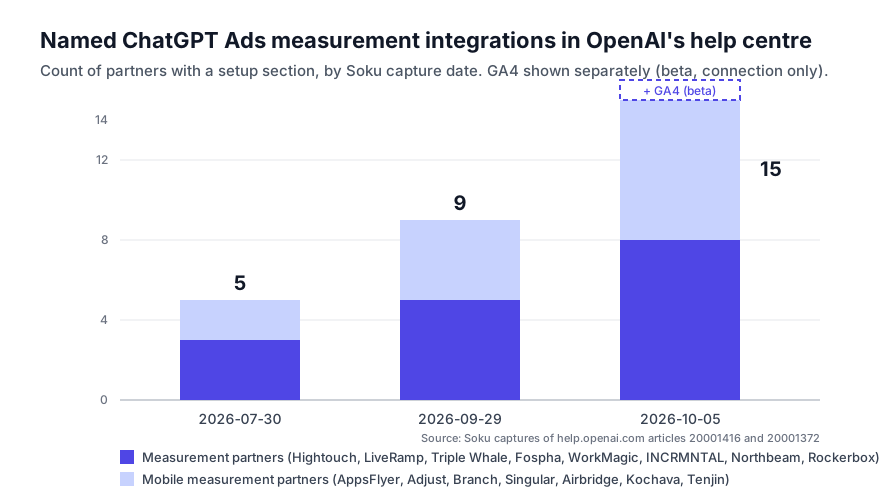
- The measurement partner article went from five setup sections (Fospha, Hightouch, LiveRamp, Triple Whale, WorkMagic) on 2026-09-29 to eight, adding INCRMNTAL, Northbeam and Rockerbox. Its intro now lists "spend reporting" and "incrementality measurement" among the capabilities. Its prerequisites now say partners need "an Ads Manager API key, or a Pixel ID and Conversions API key", so several partners connect by reading your account through an API key rather than by sending events.
- The mobile measurement partner article went from four (AppsFlyer, Adjust, Branch, Singular) to seven, adding Airbridge, Kochava and Tenjin, each with setup steps. OpenAI notes that mobile attribution through these partners "is click-based", and that the partner's windows are set in the partner while "Ads Manager uses its own attribution settings for reporting".
We've updated our ChatGPT Ads measurement partners guide with the full current list and the credential each partner asks for. The pattern matters more than any single name. Three months ago OpenAI named five integrations. It now names fifteen, plus GA4, and the new ones (incrementality, marketing-mix and multi-touch attribution vendors, and Google's own analytics) are tools advertisers use to check a channel's self-reported numbers. OpenAI is making ChatGPT Ads measurable by the tools buyers already trust, which is what a channel has to do before it gets a serious budget (Soku analysis).
The email said something different, and both are true
OpenAI's advertiser product-update email of 2026-09-30 (subject "ChatGPT Ads Product Updates") announced that advertisers "can now retrieve attributed conversion events beyond your campaign's selected goal through the public Insights API". That is documented: the Reporting guide describes adding "include": ["attributed_events"] to POST /v1/conversions/insights to see attributed events "even when they are not configured as campaign conversion goals".
The email didn't mention the GA4 connection, and the GA4 article doesn't mention non-goal event reporting. They solve related problems from opposite ends. Non-goal events let you see OpenAI-attributed purchases while optimizing for something else. GA4 lets you see everything in your analytics, and its GA4 Conversions column does not document how it credits campaigns. If your question is "did ChatGPT Ads drive purchases I'm not optimizing for?", the documented answer today is the Insights API, not the GA4 beta (Soku analysis).
What to do now
- Ask your account manager for the beta if GA4 is your source of truth. OpenAI gates access through the account manager.
- Pick the property on purpose. One property per advertiser account. Choose the one where your ChatGPT Ads landing pages and conversions actually report.
- Clear the data-sharing terms internally before connecting. The authorization covers OpenAI retrieving and using GA4 data under the Advertising Terms.
- Don't read the GA4 tile as campaign performance. It is property-wide event volume. Use it to confirm the connection is live and fresh.
- Fix your API pulls. If you report ChatGPT Ads through the Insights API, send
attribution_window_days,view_through_attribution_window_daysandattribution_time_basisexplicitly, matching the windows you show in Ads Manager, so totals stop shifting under you. - Tag landing URLs so GA4 can see ChatGPT traffic. OpenAI imports GA4's source/medium and campaign names, and GA4's own source/medium data is your clearest view of ChatGPT Ads clicks. Use a consistent UTM scheme; we laid one out in ChatGPT Ads dynamic URL parameters.
- Check the mapping before you trust the column. The Map your events step pre-fills some mappings. Confirm each one matches what the GA4 event means in your implementation, fix any "Missing event" rows you care about, and agree internally which GA4 event equals "purchase" or "lead".
How Soku fits
Soku's Second Opinion tab, part of the Dashboard since our 2026-10-01 release, puts each connected ad platform's self-reported spend, conversions and value next to what an independent source (GA4 today) credits to the same platform and campaign. It flags tracking problems such as paid clicks that never show up as site traffic, and it treats ChatGPT Ads as a platform alongside Google, Meta, TikTok and others. It doesn't add the two sides together or call a gap "over-reporting". It shows both, which is the reconciliation described above, done for you. It doesn't depend on OpenAI's GA4 beta, so it works whether or not your account has early access.
Sources
- OpenAI, Connect Google Analytics 4 to OpenAI Ads Manager, captured 2026-10-05; rewritten version (Map your events, data imported, GA4 Conversions column) fetched 2026-10-19.
- OpenAI, Measure Results, captured 2026-10-05.
- OpenAI, Set up measurement partner integrations, captured 2026-09-29 and 2026-10-05.
- OpenAI, Set up mobile measurement partner integrations, captured 2026-09-29 and 2026-10-05.
- OpenAI developer docs, Advertiser API overview and changelog and Reporting, fetched 2026-10-05.
- OpenAI advertiser product-update email, "ChatGPT Ads Product Updates", 2026-09-30 (the non-goal event item is corroborated by the Reporting guide above).
Last verified 2026-10-05; GA4 article sections re-verified 2026-10-19. Soku tracks OpenAI's ChatGPT Ads help centre and developer documentation daily and dates every factual claim to the capture that supports it. Quoted wording is OpenAI's; analysis and recommendations are Soku's own.